 Zabaganka
Your AI wishlist: every want from every store, waiting for its moment
Found something, but now is not the moment? Drop a link or just a screenshot — the AI reads the brand, name and price itself and builds the card. From there Zabaganka watches the price and tells you when the moment comes.
Open in TelegramOur partners:









 AVANT
italist
Ultrahuman
AVANT
italist
Ultrahuman
Everything saved, in one place
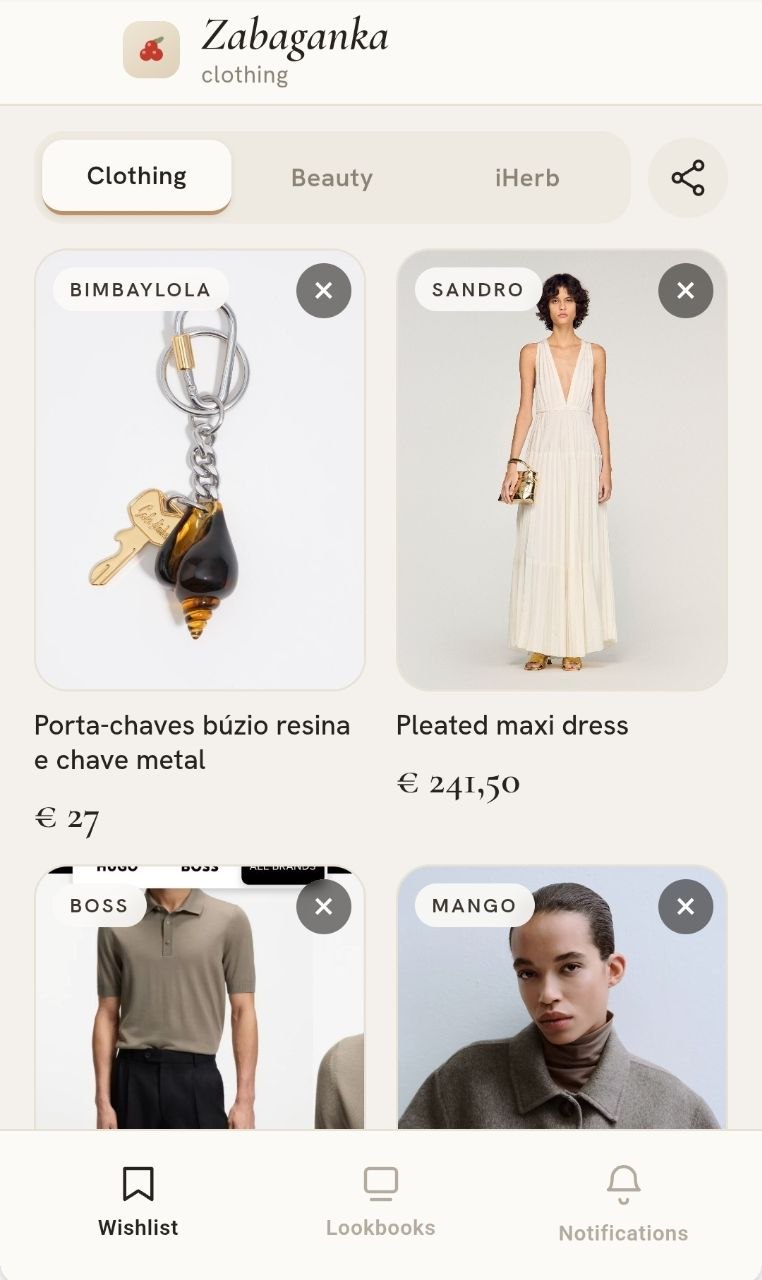
Zabaganka lives inside Telegram — there is nothing to install. Things from different shops sit side by side, with photos and prices, instead of scattered across screenshots and saved posts.
- Three sections: clothing, beauty and iHerb — so supplements never mix with dresses
- Every price in plain sight, and changes show up straight away
- Any card can be corrected by hand — name, brand, price or link
- Share the whole wishlist with a single link
A screenshot is enough — AI reads the product
We read the item straight from the picture
Some shops — Zara, Massimo Dutti, Hugo Boss — block bots of every kind, so no wishlist can pull a price from there. So we came at it from another angle: the AI looks at your screenshot the way you do.
- Snap a screenshot of the item and send it to the bot
- AI reads the brand, name, price, the old crossed-out price and availability
- The card saves itself — any field can be corrected
One wishlist for two
A shared list for a couple: what one adds, the other sees. Both can edit and delete, and price-drop alerts go to both.
"Already being gifted"
Send the list to family — they mark who's giving what. Nothing arrives twice, and she never sees it: the surprise stays a surprise.
How the screenshot-to-wishlist flow works
Send a link or just a screenshot
Saw something on Instagram, in a store, or on a website — just forward it to the bot. No link? A screenshot is enough — no need to hunt for the URL yourself.
Get a card in your wishlist
The bot pulls the photo, name, and price and neatly adds the item to your personal wishlist. Screenshots work too: it reads the brand, name and price straight off the image. Send the product link as well and Zabaganka starts watching its price.
Something read wrong? Any field on the card can be edited by hand — name, brand, price, or link.
Zabaganka tells you when the moment comes
The price drops or your size is back in stock — that's the moment. You'll be the first to know, no manual checking required.
Everything you want, sorted by category
From a basic sweater to the dress you dream about
Zara, H&M, or a small local brand — doesn't matter. Your wishlist gathers it all into one tidy set of cards and tells you when a price drops or your size shows up.
Skincare and makeup without a mess of tabs
The serum you've been meaning to try, or a perfume from someone's story — all in one place, price on hand.
Vitamins and supplements from iHerb
Your favorite jar sold out on iHerb? Save it — the bot messages you the moment it's back in stock or the price drops.
Wants don't have an expiry date
Free — and Pro when you want more
Saving by link is unlimited on both plans. The difference is screenshot reading, how many wishlists you keep, and the alerts.
Free
- Unlimited items — by link or added by hand
- 10 screenshot readings a month
- One wishlist, shareable
- Price alerts on 3 items
- Gift reservation
Pro
- Unlimited screenshot readings
- As many wishlists as you need: with your partner, your mum, for a birthday
- Price alerts on everything
- Target price: "tell me when it drops below 2000"
- Back-in-stock alerts
No payment needed to try it. Pro switches on inside the app in one tap.
About the wishlist and Zabaganka
I found something but can't buy it right now — where do I save it?
Drop a link or a screenshot into the @zabaganka_bot chat — it pulls the photo, name, and price and adds the item to your wishlist. It'll wait there as long as you need, without getting lost.
How is this better than Instagram saves?
Saved posts and screenshots get buried among hundreds of others — and by the time you're ready to buy, you don't remember what you saw or where. A Zabaganka wishlist is one tidy list with photos and prices, and the bot reminds you when it's time to go back to it.
What if the item sells out while I'm deciding?
Zabaganka tracks the availability of everything you save. If a size or item is running low or goes out of stock, you get a notification — in time to decide whether to buy now or wait.
Will I find out about a discount on something I saved?
Yes. While an item sits in your wishlist, the bot watches its price and messages you the moment it drops. That's one of the signals that the moment has come — right alongside items being back in stock.
How much does Zabaganka cost?
Nothing. Saving items to your wishlist, price and stock alerts, unlimited items — all of it is free, with no hidden plans.
What is a wishlist?
A wishlist is where things you love get to wait for their moment: with a photo, a price, and no risk of getting lost among saved posts and browser tabs.